Hi everyone! Sorry I've been a little MIA lately...we are still living at my dad's and YEP my craft box is STILL packed up. :( BUT - I'll try really hard to make it up to you with lots of fun crafts when I get my own house with my own craft room (hopefully!). We put in an offer on a home today, but the house is already under contract, so we are just a backup offer. We probably won't get it, so we are continuing to look...hoping we find that one special home soon!
Today, I've got a Silhouette tutorial for you. I originally guest posted this on Get Silvered and am excited to share it with you guys now! For those of you who don't know, I own the Silhouette Cameo and L-O-V-E it. I use it for almost every craft I make. One in particular is the Maternity Countdown Shirt that I sell {SHOP}. I make each shirt by hand and would cut out a stencil for the numbers each and every time. It was kind of time consuming and used up a lot of vinyl per shirt. Just a couple months ago, I found out that Silhouette sells a -- you ready for this? -- REUSABLE STENCIL MATERIAL!!!!!! I pretty much freaked out and immediately bought some to try out. Well, it's AMAZING! It's basically a thin plastic that I use over and over and over again. I make so many shirts with one stencil - it saves me SO much time and money. This post is all about my review and a tutorial for cutting and using it!
The Stencil Material comes in a tube. This is great for storing, but not totally great for the stencil material itself. Mine had a few bubbles (you can see in pic below) which made me think at first that the cutting part did not cut all the way through. I was happy to see when I unloaded it that it did cut perfectly - I just had to pull the stencil off the paper backing carefully to make sure it came off along the cut lines in a couple of places. {addition: since I wrote this review, I've purchased more stencil material, and it didn't bubble. Maybe it was just my first try...!}
Search This Blog
Showing posts with label Silhouette Cameo. Show all posts
Wednesday, May 28, 2014
Tuesday, April 8, 2014
Substitute Teaching at Silhouette School |
Hey friends! Wake up! It's time to get to school! No...you can't have 5 more minutes. Go!
Today, I am substitute teaching at Silhouette School, an awesome blog that teaches you all about using your Silhouette cutting machine. That is SO not a school I'd want to miss one day of. You will love Melissa and her fantastic blog all about my favorite cutting tool.
I am sharing my tutorial for How to Cut Fabric with your Silhouette. The post on Silhouette School links back to my tutorial, but you should definitely stop by and thank Melissa for having me sub for her class. Also, whether you have a Silhouette or not, you have to check out all the amazing projects on Melissa's blog. It's a giant blog of inspiration for any type of project!
Today, I am substitute teaching at Silhouette School, an awesome blog that teaches you all about using your Silhouette cutting machine. That is SO not a school I'd want to miss one day of. You will love Melissa and her fantastic blog all about my favorite cutting tool.
I am sharing my tutorial for How to Cut Fabric with your Silhouette. The post on Silhouette School links back to my tutorial, but you should definitely stop by and thank Melissa for having me sub for her class. Also, whether you have a Silhouette or not, you have to check out all the amazing projects on Melissa's blog. It's a giant blog of inspiration for any type of project!
xo
*********************************
You may also like
Labels:
fabric,
Silhouette Cameo,
Silhouette Tutorial
Tuesday, March 25, 2014
Guest Posting at Get Silvered ... How to use Silhouette Stencil Material ... PLUS an Ad Space Giveaway! |
What up, peeps? Today, I have the pleasure of hanging out at Get Silvered, where I am sharing my review of Silhouette Stencil Material. Spoiler alert: IT'S AWESOME! I use vinyl for stencils ALL the time - mainly for making the Maternity Countdown Shirts I sell online - and making a new vinyl stencil for each one takes up a lot of vinyl. I was intrigued when I saw that Silhouette sold a "stencil material" that was reusable! Head over to Get Silvered to see my full review and get a tutorial on how to use this kick A stuff. :)
WAIT!
HANG ON!
DON'T GO!
I'll miss you.
To keep you HERE ... I have an exciting announcement!
Labels:
advertise,
GIVEAWAYS,
Silhouette Cameo,
Silhouette Tutorial,
vinyl
Tuesday, March 18, 2014
Silhouette Cut File and Card Tutorial ... Guest Post by Pam from Get Silvered |
Hello, I'm Pam from GetSilvered.com and I'm so happy to share a project here at Put a Bird On it.
Thank You Daniela, it's a pleasure to be contributing to such a creative site.
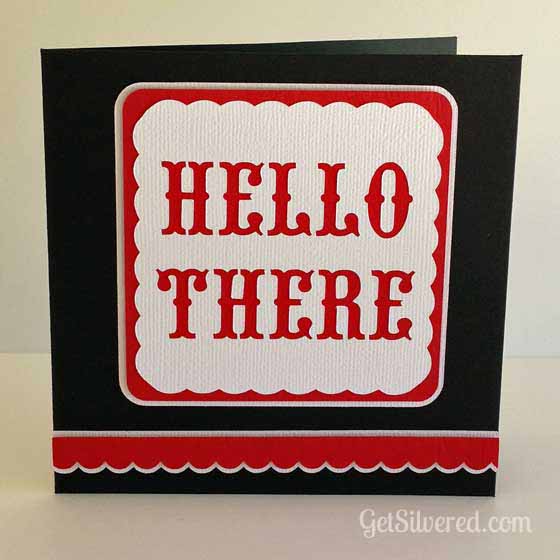
I'm sharing a Cutting File and instructions to make this cute card with a Silhouette Cutting Machine. It's perfect for many occasions and best of all - it's quick and easy.
Supplies:
3 Colours of Card stock | Silhouette Studio File >> Free Download here | Double Sided Tape | Double Sided Foam Tape & Squares | Glue Pen | Scissors | Silhouette Cutting Machine | Patterned Paper (optional) |
Instructions:
Assemble the card:
Options:
Next week, Daniela will be contributing over at Get Silvered. I'm really looking forward to her awesome Home Decor project. Be sure to look out for it!
Thank You Daniela, it's a pleasure to be contributing to such a creative site.
I'm sharing a Cutting File and instructions to make this cute card with a Silhouette Cutting Machine. It's perfect for many occasions and best of all - it's quick and easy.
Supplies:
3 Colours of Card stock | Silhouette Studio File >> Free Download here | Double Sided Tape | Double Sided Foam Tape & Squares | Glue Pen | Scissors | Silhouette Cutting Machine | Patterned Paper (optional) |
- Download & open the free file in the Silhouette Studio Software
- First cut the card base: Load the Black Cardstock onto the cutting mat and into the Silhouette, then adjust the Cut settings in Silhouette Studio to correspond with the thickness of cardstock being used.
- The files are laid out as in the screenshot below. Ungroup & move the other shapes off the Virtual Mat on the computer screen, leaving only the card base and select ìsend to Silhouetteî
- Repeat again to cut out the Scalloped Borders, Squares and Text overlay with the contrasting cardstocks. Refer to the colour guide on the file (see screenshot above) & change cardstock on the real cutting mat and move the various shapes on or off the virtual cutting mat as needed.
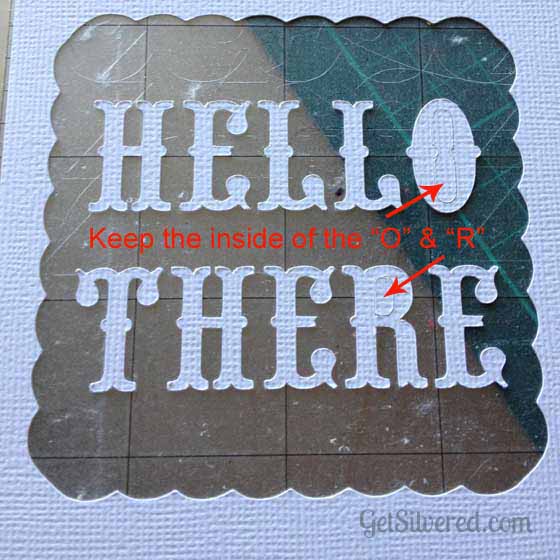
- When removing the text panel from the cutting mat, keep the cut outs from the centre of "O" & "R" as theyíll be needed later. You may be able to save the letters for another project too.
Assemble the card:
- First, attach the White Text overlay to the Red backing Square. Use Double sided tape on the back over the solid areas and a glue pen around the intricate cut out sections near the letter cutouts.
- Now fix the combined layers to the large white backing square with Double sided foam tape. Apply the little foam squares (or foam tape cut to size) to the back of the red scalloped border and attach that on top of the larger white scallop. Using the foam tape gives dimensional interest to the card.
- Carefully position and attach the assembled panels and scallops onto the Card base with Glue or Double Sided Tape. Attach the middle pieces (if you haven't already done so) of the "O" & the "R" that you saved earlier.
Options:
- You can really change the style depending on the materials used. I love the Red, Black and White colour theme, but just for something different I made another version too. This time I used a patterned paper instead of a contrast card, and added an extra scalloped border.
- I didnít have any card or paper in a wood grain pattern so I attached contact paper to a piece of plain cardstock and then cut it all together using the heavy cardstock settings in the program.
- The cards are blank inside, but you could add an extra panel with a printed greeting or add a cut out sentiment or a sketch pen greeting. If sketching or printing, do it before you cut out the card base.
- You can add extra design elements inside too ñ I added a scalloped border & a heart to the inside of the Kraft card to pretty it up!
Next week, Daniela will be contributing over at Get Silvered. I'm really looking forward to her awesome Home Decor project. Be sure to look out for it!
*****************************
Thanks, Pam! I asked Pam to do a card project, because I don't tap into card making & paper crafting as much as I would like to. I love seeing all the intricate layouts that scrapbookers do. I definitely want to get into making homemade cards, since I have a Silhouette Cameo.
Here are some of my fave posts from Get Silvered:
**EEEK! This idea is total #swoon
What is your favorite thing to make with a cutting machine? I love hearing all the different things people create! Have a great day!
xo
Let's be photo junkies together >> Instagram @putabirdonitblog
Labels:
card making,
Silhouette Cameo,
Silhouette Tutorial
Monday, March 17, 2014
How to Cut Fabric with a Silhouette Cameo & St. Patrick's Day Wreath |
HAPPY ST. PATRICK'S DAY!!
ARE YOU WEARING GREEN?!
Ok, I just love holidays! Even if I don't go all out celebrating them every year. Nope - no St. Patrick's Day mantel or treats at my house! Bad craft blogger - I know. :) But I try to do something for each holiday. I did make Shamrock Cupcake Toppers last week {click HERE for the tutorial!}. I also made an easy, last minute St. Patrick's Day Wreath for my front door. I did it in under 30 minutes Saturday morning while my lovies slept in {"lucky" them!}. I took my polka dot birthday wreath {HERE} and upcycled it into this little number. Best part of my project? Cutting fabric with my Silhouette Cameo! Even bester part? I got a NEW CUTTING MAT! I've been cutting with an old, non-sticky mat {think painters tape being used to hold down my card stock! boo}. It was a DREAM cutting fabric with my new mat and my Cameo. Total dream. I cut this adorable white shamrock fabric into pennants for the banner on my wreath. On to the tutorial!
![]() |
| > PIN IT < |
Supplies
Fabric | > Interfacing < | Iron | Scissors | Silhouette Cameo & Cutting Mat
The Fun Part
Labels:
burlap,
fabric,
gold,
polka dots,
Silhouette Cameo,
Silhouette Tutorial,
St Patrick's Day,
wreath
Tuesday, February 11, 2014
DIY Glitter & Gold Heart Sleeves made with Homemade Fabric Paint ... And A Silhouette Studio Tutorial |
This project was SO EASY, I can't stress the EASY factor enough here. I made it in about 20 minutes the night before Build Your Blog Conference, because I wanted to wear this cute cardigan to the conference. I definitely wore my heart on my sleeve that day. :)
Here's what you'll need to make your own cute heart-on-my-sleeve shirt:
The Goods
Shirt {I used a cute cardi I got on sale at Target}
Heart Stencil {I cut mine out of vinyl using my Silhouette Cameo}
Fabric Paint {2 parts acrylic paint + 1 part fabric medium}
Foam Brush
Here is the tutorial for making a stencil using a Silhouette Cameo. I just LOVE my Cameo, guys. I use it almost every day. It's rare for me to make a project without using it in some way. I thought it'd be helpful to show how to make a heart stencil out of vinyl using the Cameo and designing it in Silhouette Studio. If you don't have a Cameo {yet!}, you can skip this part and go to the next part about painting on your shirt. You can make a stencil out of freezer paper or buy a heart stencil from the store. After seeing how easy it is with a Cameo, though, you might be headed out to get one for yourself.
*I know it seems like a lot of photos, but I swear it is SO easy. Don't let the photos scare you - I just like taking photos, ok?! ;)
Labels:
clothing,
DIY,
fabric paint,
fashion,
gold,
hearts,
Silhouette Cameo,
Silhouette Tutorial
Monday, February 3, 2014
Guest Posting at Boughtin Baby {DIY Polka Dot Burlap Wreath} |
Well, friends, I am visiting another blog today! Remember the adorable onesies Ava got to where a couple weeks ago from Boughtin Baby & Bride? I am over there, at Cady's blog, sharing the pink polka dot burlap wreath I made for Ava's 1st birthday party. It was really easy (of course!) and extremely adorable, IMO, so make your way over there to read all about it! My favorite part? Turning balloons into bows!
To get you excited...here is a peek at what you'll be learning to make!
Click HERE to view the tutorial!
xo
Enter the fab giveaways I'm currently hosting!
Labels:
Baby,
birthday,
burlap,
guest post,
party ideas,
polka dots,
Silhouette Cameo,
super easy,
wreath
Tuesday, November 5, 2013
DIY Baby Wonka Bar Costume |
It all started when a certain spouse of mine decided Ava should be a WONKA bar for Halloween. *sigh* He might have a slight obsession with the Willy Wonka movie -- the old one -- not the Johnny Depp version. Well, you can't just go out and BUY a baby wonka bar costume. They don't exist. Even if you could, I wouldn't, because Halloween costumes cost one gajillion dollars. So I knew I had to get my craft on if I was going to make my husband's Halloween dream come true. And it really wasn't even that hard. I can't sew. Nope! I even have my grandmother's sewing machine, but I've never learned. That's definitely on my TO DO list. But, until then, it's a no-sew life for me. I decided to use fabric dye and fabric paint to make Ava's wonka bar costume. Like I said earlier - it wasn't even that hard. YES - I did fail the first time I tried fabric dye. And YES - I thought about giving up. And YES - I did eat almost 100 mike & ike's out of frustration. But it all worked out in the end.
SO.
To check out how to dye your fabric brown, click HERE for my Fabric Dye Tutorial.
In order to do this, you will need my Wonka Bar Costume stencil. You can find it {along with my other Free Printables & Stencils} by clicking on the links below:
Now, don't you feel super special knowing you are one of the ONLY people on the planet to have a Wonka bar baby costume stencil??!!!! Welcome to the cool kids club.
I'm definitely a visual learner, so the rest of the tutorial will be through pictures. Have fun! And remember -- candy is dandy, but liquor is quicker.
**Note: I used fabric paint, because I'm kind of obsessed with it, but you could use heat transfer material, too. Just cut out the different shapes and letters in the colors you want. That would work quite splendidly!**
As you can see, this is fun for a family Halloween costume set, but I think it would be cute for a Wonka themed birthday party! Which, knowing that certain spouse of mine, I could see being requested in the future.
SO.
To check out how to dye your fabric brown, click HERE for my Fabric Dye Tutorial.
In order to do this, you will need my Wonka Bar Costume stencil. You can find it {along with my other Free Printables & Stencils} by clicking on the links below:
Now, don't you feel super special knowing you are one of the ONLY people on the planet to have a Wonka bar baby costume stencil??!!!! Welcome to the cool kids club.
I'm definitely a visual learner, so the rest of the tutorial will be through pictures. Have fun! And remember -- candy is dandy, but liquor is quicker.
**Note: I used fabric paint, because I'm kind of obsessed with it, but you could use heat transfer material, too. Just cut out the different shapes and letters in the colors you want. That would work quite splendidly!**
Pull up the stencil file in Silhouette Studio. You'll have to change the settings to looks like these. The main ones to note are: change the width to 9 and the height to 15 and change the cutting mat to NONE. These are the settings I used for a 6-12mths size baby nightgown. You can adjust to whatever size you need.
![]() |
| **Hover over top left of photo to PIN!** |
1. Load your vinyl in your Cameo or Portrait. I used 9" vinyl, but you can use 12" as well.
2.
In Silhouette Studio, send the file to the Cameo to cut. Once you
choose the Vinyl as the item you're cutting, the rest of the settings
change for you. Remember to make sure you have your blade in your Cameo
set to what setting it shows on your computer screen. Once it's all set,
press CUT! Sit back, and watch the magic.
3. Cut off your vinyl stencil!
4. Using your hook tool for assistance, peel away the letters and border, so you have the negative space left.
**here's
a tip. if you don't have a hook tool {yet!}, i've used a fondue fork or
even scissors to help peel away the vinyl. but the hook tool works the
best!**
5. Apply the transfer tape to the front
of your stencil. I peel a small portion off and press it on the end of
the stencil, then peel & roll the rest of the tape over the stencil.
Peeling all the tape off and then applying it to the stencil makes for
lots of wrinkles.
6. Flip the stencil over and use your scraper tool to adhere the vinyl to the transfer tape.
7. Peel the transfer tape backing off. I use my hook tool to help press down any vinyl that didn't stick.
8. Keep that shiny backing piece. You'll use it later!
9. Apply the stencil to your fabric. Carefully remove the transfer
tape. Press over your stencil to make sure there are no bubbles.
10.
Insert the shiny backing from the transfer tape you saved in Step 8
inside the nightgown. This will keep any fabric paint from bleeding
through to the other side. What's nice about using this backing is that
it doesn't stick to the dried paint!
11. Use your fabric paint to paint over the stencil. This is the fun part! Let dry for several hours {I usually leave mine overnight}. Peel away stencil and view your beautiful, delicious, scrumdiddlyumptious Wonka Bar!!
As you can see, this is fun for a family Halloween costume set, but I think it would be cute for a Wonka themed birthday party! Which, knowing that certain spouse of mine, I could see being requested in the future.
xo
Here's more spooky inspiration for you {the coolest person ever!}:
Labels:
Baby,
clothing,
fabric dye,
fabric paint,
Halloween,
heat transfer,
no sew,
party ideas,
Silhouette Cameo,
Willy Wonka
Wednesday, October 23, 2013
Easy No Bake Cheesecake In A Jar {with labels!} |
Yum.
That is one of my favorite words: YUM!
Because it usually means I am either looking at or partaking of something delectable and most likely full of sugar and butter.
Yum.
Today's post is full of YUM. And full of EASY. It's no bake cheesecake in a jar! If this treat was any easier, it would be a sin. I looked through a GAJILLION recipes online to find one that sounded easy and yummy and that I had most everything in my cupboards. The one I decided on was just a photo of a recipe from Woman's Day magazine. Itwerked tweaked it a little {hardy har har} to get it juuuuuust right the way I liked it. Again. Super easy. And of course - super YUM.
Here is my version of the recipe:
No Bake Cheesecake In A Jar
serving size: 6 jelly jars or 3 pint jars
supplies:
the fun part:
YUM, right? YUM YUM YUM.
Just once more: YUM.
If you so desire, you can print these adorbs labels to add to your mason jar. I used Silhouette Sticker Paper to print and cut my labels with my Cameo. If you want the Studio file, leave me a comment, and I'll post a link to the free file you can download and use.
That is one of my favorite words: YUM!
Because it usually means I am either looking at or partaking of something delectable and most likely full of sugar and butter.
Yum.
Today's post is full of YUM. And full of EASY. It's no bake cheesecake in a jar! If this treat was any easier, it would be a sin. I looked through a GAJILLION recipes online to find one that sounded easy and yummy and that I had most everything in my cupboards. The one I decided on was just a photo of a recipe from Woman's Day magazine. I
| The photo I found online where my recipe came from {womansday.com} |
No Bake Cheesecake In A Jar
serving size: 6 jelly jars or 3 pint jars
supplies:
- one and a half 8oz packages cream cheese
- three tablespoons sugar
- one cup heavy cream
- two teaspoons lemon juice {or more to taste}
- graham cracker crumbs {easy to crush your own or buy in a box}
- strawberries {or fruit of your choosing // can use pie topping as alternative}
- strawberry glaze {usually found in the produce by the shortcake}
- mason jars {I used pint jars}
the fun part:
- mix the cream cheese and sugar {I used my KitchenAid} until smooth. Reduce speed to low and add heavy cream. Increase speed to high until cheesecake is thick, creamy and maximum deliciousness is achieved {just a couple of minutes}, then add lemon juice and mix a minute more.
- Test cheesecake batter with finger. May need second taste test {or third...or fourth...}.
- Now layer! graham crackers crumbs << cheesecake << strawberries << cheesecake << glaze << strawberries
- Try really hard not to eat YUM treat before giving it to your friend...or decide you don't really need friends and eat YUM treat instead.
YUM, right? YUM YUM YUM.
Just once more: YUM.
If you so desire, you can print these adorbs labels to add to your mason jar. I used Silhouette Sticker Paper to print and cut my labels with my Cameo. If you want the Studio file, leave me a comment, and I'll post a link to the free file you can download and use.
YUM
Like what you see? Follow my blog! Click "Join this Site" {right side bar} to connect and be my new favorite person.
Thursday, October 17, 2013
Candy Corn Cocoa |
CONFESSION:
I don't like candy corn!!
There. I said it. I guess I have to wear my red letter A (or orange letter C?) around town this time of year. It just does nothing for me. I'm more of a reese's pumpkins / ghost peeps kind of girl. But basically everyone else in the world loves candy corn! It's the perfect Halloween treat. I created a little candy corn cocoa mix to give for my "You've Been Booed" treat {free printable HERE!}. It is easy, cute, and YUMMY.
What you'll need:
- Mason Jar
- Halloween Ribbon
- Hot Cocoa Mix
- Mini marshmallows {try the ghost mallows for a spooky touch!}
- CANDY CORN
I added a BOO! sticker I printed using Silhouette sticker paper and a couple stripey Halloween straws to finish it off.
And, to be honest, this kind of made me want to eat the candy corn...
If you make this, link it up! I'd love to see!
Labels:
gift ideas,
Halloween,
party ideas,
Silhouette Cameo,
sticker paper
Wednesday, October 16, 2013
You've Been Booed {2013} free printable |
Last year, I created a free printable for the fun neighbor "You've Been Booed" tradition. I didn't actually deliver them to anyone, though! I even made choco covered halloween Oreos and had them all in their bags with signs ready to go -- but kept forgetting to take them and then HALLOWEEN CAME AND WENT with my bags sitting by my front door. SAD!!! I couldn't be lame two years in a row, so I decided to actually deliver the treats this time! I wanted to make a new printable, just to start a tradition of making a new one every year. This time, I tried to play off the popular CHALKBOARD theme I'm seeing all over Pinterest. I made a door hanger BOO sign as an alternative to a sign you put up in your window. It was fun coming up with a design. I'm still so new at this! But I have fun, make mistakes, never think it's cute enough, change it a million times, then just STOP at some random point and print it out, because I'm tired of editing it! I also made up my own Candy Corn Cocoa mix {blog post coming soon!}.
***************************************************
Expecting a little boo soon? Buy a Maternity Countdown Shirt HERE!
Here are your download links. Happy Halloween!
Want to try Candy Corn Cocoa? Check out my posts HERE!
Here are more ghoulish delights from me!
***************************************************
Expecting a little boo soon? Buy a Maternity Countdown Shirt HERE!
Labels:
Halloween,
Paper,
printables,
Silhouette Cameo,
super easy
Subscribe to:
Posts (Atom)